
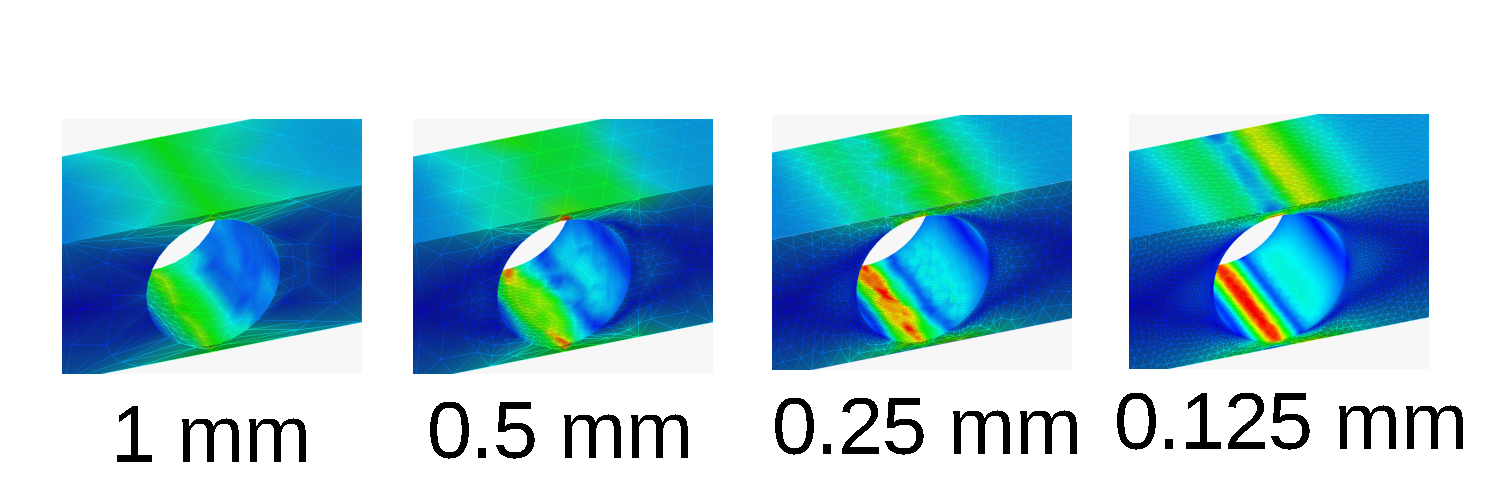
Are you working on a project consisting of FEM simulations done in FreeCAD? Are you using trial-and-error to converge your models? Or perhaps just running simulations on variations of the same basic geometry? Are you getting brain damage from the tedious and repetitive work of setting up simulations, and then babysitting them as they run??!!
Well — fret no more! Introducing: an Automatic FreeCAD FEM Library! It contains functions designed to run without user input, almost as though it’s intelligent… but artificially. Using this library is free for one month, and then you’ll be automatically charged our monthly subscription fee of just $0.00.
Product Requirements
The library should:
- Set up and run simulations by:
- Setting geometric/simulation parameters
- Meshing the model
- Solving the simulation
- Use basic logic to implement convergence studies
- Require no user intervention while the program runs
- Replace user “babysitting” by automatically detecting and compensating for random solver/mesher errors
- Log information that can be recovered after a system crash
- Be easy to understand and modify
The library doesn’t need to:
- Be optimized or use complicated logic
- Have any abilities beyond those of a user clicking buttons manually
- Be user-friendly or tolerant to user error
The Library
is available on Github here: https://github.com/Jacob-Chiu/automaticFreecadFemScript. The library itself is contained in “automaticFem.txt”. A complete list of methods and instance variables is documented in “documentation.txt”.
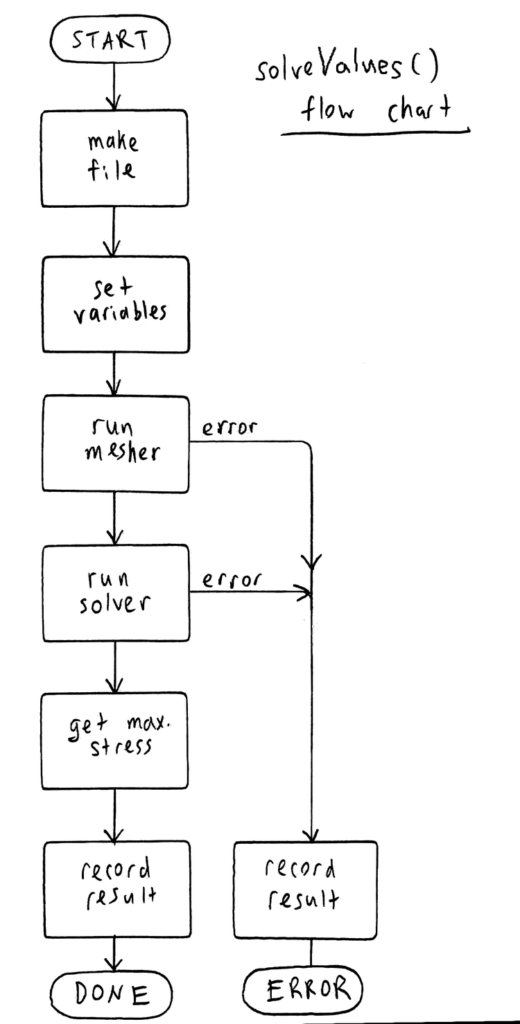
The intended workflow of this library is to make copies of a template file, modify some variables in a Variable Set to set simulation/model parameters (e.g. dimensions, mesh size, etc.), mesh and run the simulation, record the results, and finally close the simulation file so that another can be opened.
The library is implemented in a Python class with methods for each of the preceding actions, and the entire workflow is implemented in the solveCondition() and solveString() methods.
As much as possible, the library uses the exact same code that is executed by the GUI. I found the right commands by turning on “Show script commands in Python console”, and also by looking through the FreeCAD source code to find out what the mesher and solver Task Panels were doing.
Mesher
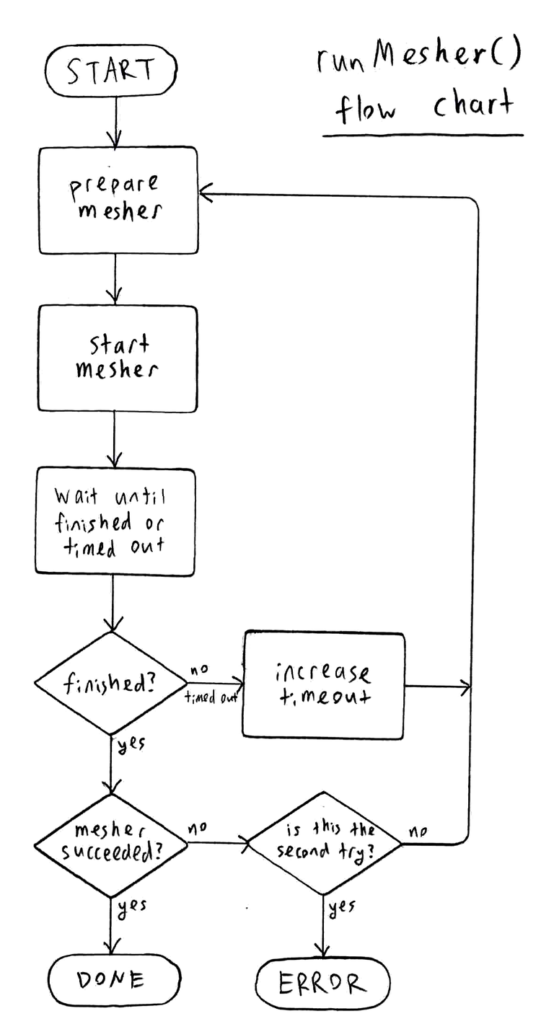
The library is currently written to use the Gmsh mesher. However, it can be easily modified to support a different mesher.
A common error I encountered with Gmsh is that it will sometimes run for a long time without ever finishing. This isn’t caused by user error, and can be resolved by killing and re-running the mesher. To address this in code, I used a watchdog timer to automatically kill and restart the mesher after 1 minute. This 1-minute time limit increases by 4 times for each subsequent run, allowing large meshes which have legitimately long run-times to complete after timing out once or twice.
Gmsh can also randomly fail but exit correctly, so the library is coded to re-try failed meshes, and only throw an error after two failures.
Solver
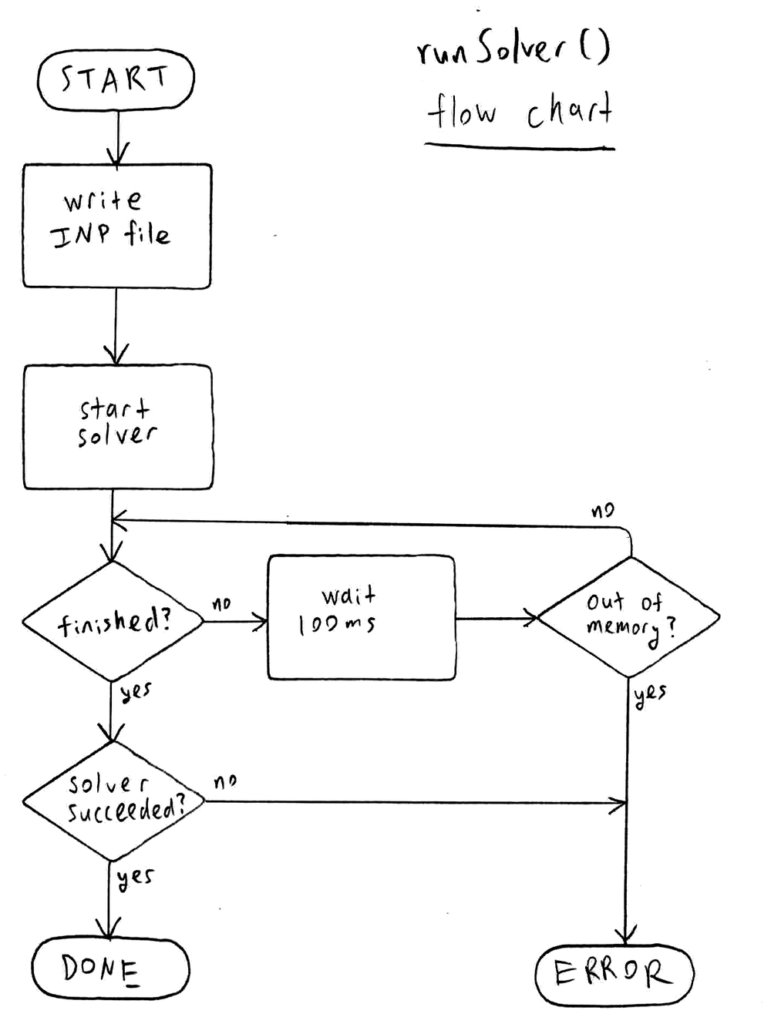
The library is currently written to use the Calculix solver, though it can be modified to support a different solver.
I didn’t notice any random errors with Calculix. However, it can use so much memory on finely-meshed simulations that it crashes the computer, so I programmed the library to monitor memory usage with psutil and kill the solver if too much memory is used.
For reasons mysterious to me, I found that loading the simulation results took considerably longer when run in the shell as compared to when run by the GUI. The solution was to insert the solver code into the Qt event loop using the “QtCore.QTimer.singleShot()” method.
Outputting Results
Simulation results are recorded in four ways:
- Status updates on each simulation, including results, are printed to the Python shell
- The same updates are saved in a log file named “log.txt” in case the system crashes
- A CSV file named “result.csv” records:
- File creation time
- Simulation parameter values
- Meshing time
- Mesher exit code
- Solving time
- Solver exit code
- Max. von Mises stress
- Max. shear stress
- Each simulation is run and saved in a separate FCStd file for the user to review later
Also, the mesher/solver run times and exit codes, and maximum von Mises/shear stresses for the currently-open simulation are recorded as instance variables.
Pre-Written Scripts
I also wrote a few scripts using the library’s functions to perform common FEM tasks.
List of Values
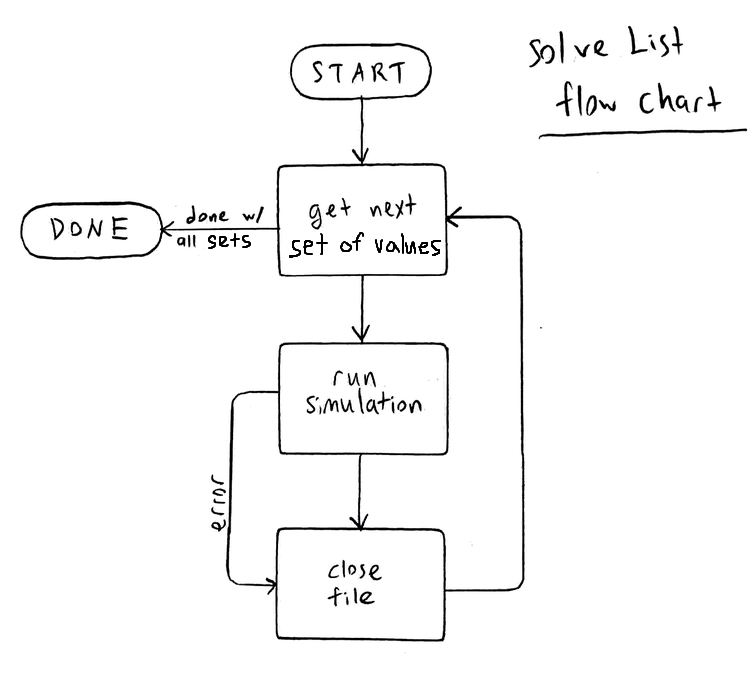
This script that automatically sets up and runs simulations based on a user-inputted list of parameter values. This can be used for parametric studies or sensitivity analysis.
Mesh Size Convergence Script
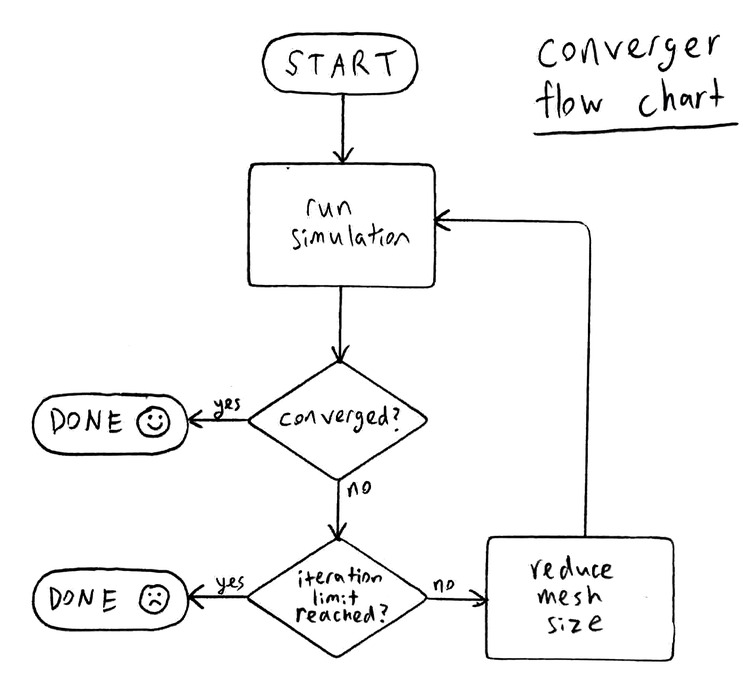
As a simulation’s mesh size decreases, the simulation becomes more accurate — simulated stress approaches the real stress value. To determine the mesh size needed to get a result which is “good enough”, the convergence study is often employed, where mesh size is decreased until the stress in the model converges (i.e. it stops changing).
This script automate the convergence study by halving the element size of a model until its peak Tresca stress converges to within 5% of the previously-simulated stress.
The title image of this blog post depicts graphically the stages of a convergence study on the stress in a beam with a hole.
Contact Simulation Convergence Script
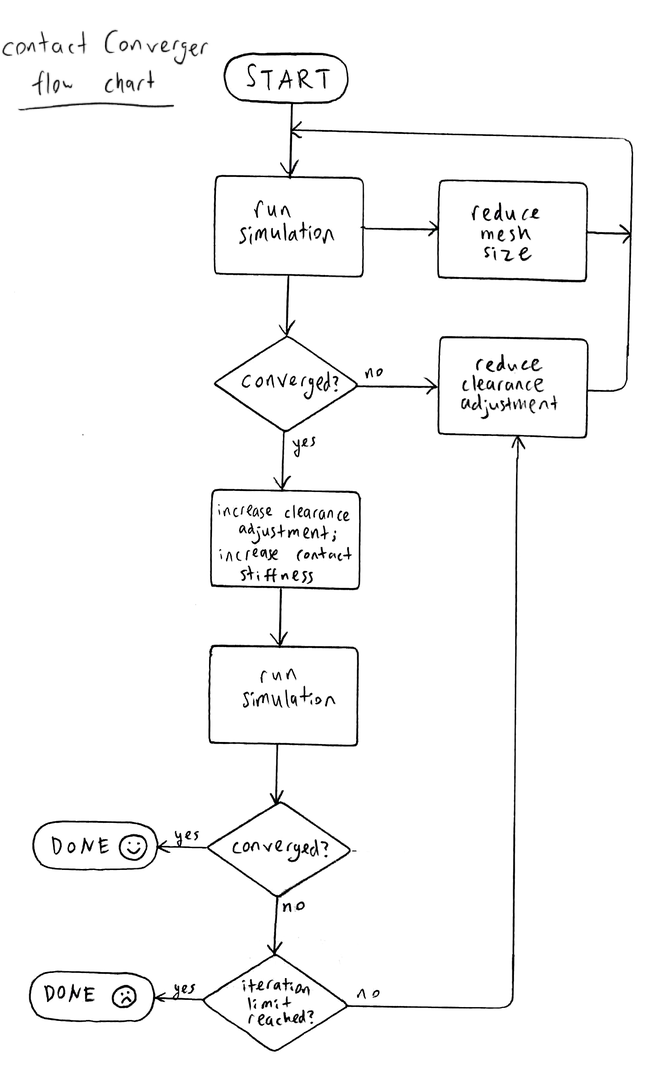
This script runs convergence studies for contact simulations; which decreases mesh size, decreases clearance adjustment, and increases contact stiffness until convergence is reached. The algorithm used is based on my previous experimentation on contact simulations.
Notes
- It is very important that the template file be tested and troubleshooted before running any automatic studies. Make sure the boundary conditions are behaving as intended, and the mesher and solver will run successfully under the expected range of parameter inputs.
- The library looks for variable set, mesher, and solver objects based on their names, so it’s important for them to be named like this:
- variable set — “VarSet”
- Gmsh mesher — “FEMMeshGmsh”
- Calculix solver — “SolverCcxTools”
- The library deals with the object names that are defined internally in FreeCAD, and these are sometimes different from the labels which appear in the GUI. For example, if you create Gmsh object named and labelled “FEMMeshGmsh” by default, then delete it and create another, the new object will be named “FEMMeshGmsh” but be labelled “FEMMeshGmsh001”.
- The library uses the psutil library to poll the computer’s available memory, which FreeCAD, when installed as a snap package, is normally unable to import. In order to import it, psutil must be installed into one of the snap package’s directories; I had success installing it in
/home/USER/snap/freecad/common/.local/lib/python3.12/site-packages
using the command
$ pip install psutil --target /home/USER/snap/freecad/common/.local/lib/python3.12/site-packages
Acknowledgement of (and Soapbox on) AI use
Writing this library involved using unfamiliar syntax, troubleshooting silly errors, and combing through source code. I used the free version of ChatGPT to help me with this.
That said, the majority (>90%) of the code was written by me, rather than being copy-pasted. All the higher-level logic (what’s depicted in the flowcharts) is mine, or based off my research on the internet and the textbook Practical Finite Element Analysis for Mechanical Engineers; none was created or inspired by AI. To ensure this, when using ChatGPT to check my code, I specifically instructed it to look only for errors that would prevent the code from executing at all.
I don’t generally support the use of AI as a student. I believe that learning often comes from “taking the long way” and absorbing all the little intricacies and complexities that aren’t officially part of the curriculum. AI is a way to automate all that, and it seems silly to me to automate away your own education. But because I don’t intend pursue programming, I don’t feel the need to experience reading documentation and tracing others’ code. However, I do feel as an aspiring engineer that I ought to practice using logic and experimentation, and so I didn’t offload this to AI.
Planned Improvements
- Allow the names of solver and mesher objects to be inputted, instead of requiring that they be named a certain way
- Allow the automatic setting of materials.